
Connect your inventory feed
Your inventory feed is how your cars get from your DMS or inventory provider onto your website. You set it up once on the Integrations tab, and it syncs every 5 minutes after that.
Who can do this: only an owner.
Connect a feed
- Open Settings → Integrations. The Inventory feed (DMS) card is at the top.
- Choose your Feed type: HomeNet IOL (XML), VinSolutions (CSV Export), VinSolutions (XML Feed) or Custom CSV.
- Paste the address your provider gave you into Feed URL.
- Click Save feed.
- Click Sync now to pull your cars straight away instead of waiting.
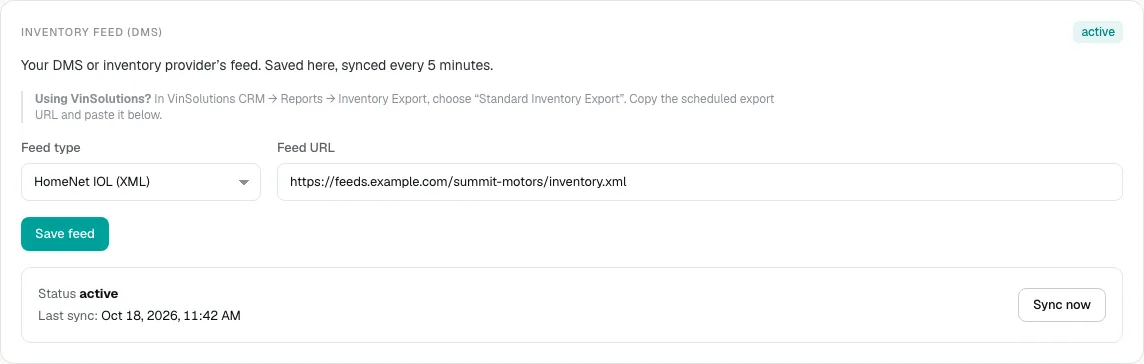
Using VinSolutions? In VinSolutions CRM, go to Reports → Inventory Export and choose Standard Inventory Export. Copy the scheduled export URL and paste it into Feed URL.
Check the feed is working
Under the form you see the feed's Status and Last sync time, and the card has a status label in its corner.
- active means the last sync worked.
- Error means the last sync failed. The error message appears in red under the status. Check the Feed URL with your provider, then click Sync now.
- Not connected means no feed is saved yet.
Things to know
- Your feed is the source of truth. A car that drops out of your feed is taken off your live inventory, and some details you edit in the console are overwritten by the next sync. How your inventory feed syncs explains which fields.
- Only one feed is live at a time. If you change Feed type and save, the old feed stops syncing.
- Some dealers get their inventory as an automated file drop that DealerApex sets up. If your card says Automated feed drop, the Feed URL and Sync now aren't used. Your inventory still syncs every 5 minutes.
Common questions
Where do I get my feed URL?
From your DMS or inventory provider. Ask them for an inventory export URL in HomeNet IOL XML, VinSolutions or CSV format.
I clicked Sync now and nothing happened.
If you see "Add the Feed URL and save it before syncing", paste the URL and click Save feed first. If the status shows Error, read the red message and check the URL with your provider.
My provider only offers SFTP. Can I use it?
Not from this page. Email [email protected] and we'll set up an automated file drop for you.
Still stuck? Email [email protected] with the page you were on and what you expected to see.