
Why your sidebar shows what it shows
Two people at the same dealership can see different sidebars. This article explains why: your role and which features are turned on for your account. It also lists where each page lives, because many pages are tabs rather than sidebar links.
1. Your role
Owners, editors and viewers see every section. The four job roles see only their own sections. Here is what each looks like:
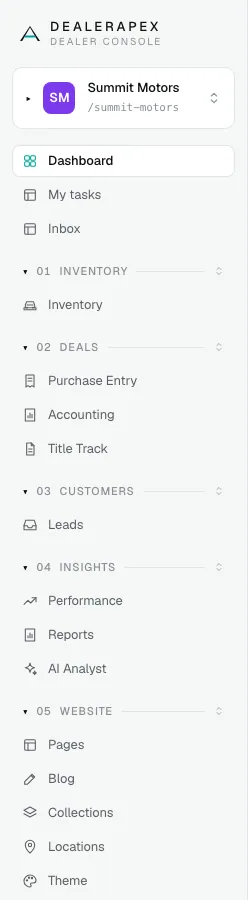
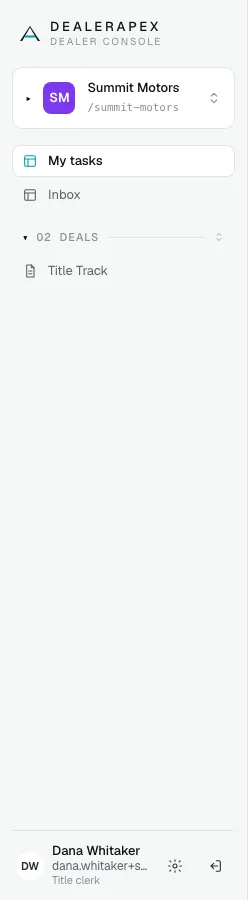
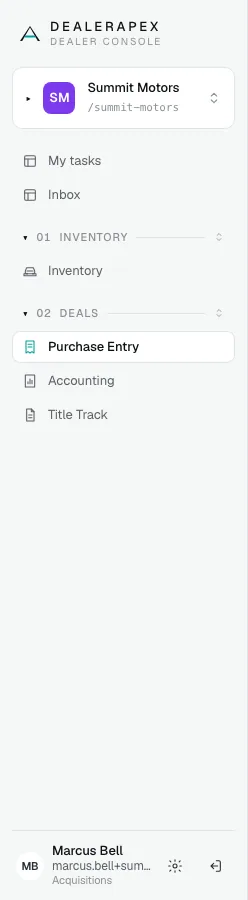
The full list of roles is in Roles and permissions. Your role is shown under your name at the bottom of the sidebar.
2. Features turned on for your account
Some sections only appear when a feature is turned on for your dealership. When it is off, the section is hidden for everyone, owners included.
| You don't see | Because |
|---|---|
| My tasks, Inbox, the bell and Search tasks… | Tasks is not turned on. |
| Notifications under Settings | Notification settings are not turned on. |
| Automations under Settings | Automations are not turned on. |
| The Find box in the top bar | Find is not turned on. |
To turn one on, ask your DealerApex account manager or email [email protected]. Once they are on, see My tasks and Inbox, Notification settings and Automation recipes.
3. Where each page lives
The sidebar has six groups. Related pages are tabs at the top of a section rather than separate sidebar links:
| Sidebar | Section | Tabs |
|---|---|---|
| Inventory | Inventory | Live, Unpublished, Insights |
| Deals | Purchase Entry | Purchase entry, Sources, Contacts |
| Deals | Accounting | Ledger, Checks |
| Deals | Title Track | Its own tabs, such as Workstation and Settings |
| Customers | Leads | Inbox, Conversations |
| Insights | Performance | Performance, Traffic |
| Insights | Reports and AI Analyst | None |
| Website | Pages | Pages, Media |
| Website | Blog | Posts, Authors |
| Website | SEO | SEO, AEO, Redirects |
| Website | Collections, Locations and Theme | None |
| Settings | Settings | General, Team, Domains, Integrations, Alerts, Notifications, Automations, Documents |
| Pinned at the top | My tasks | Mine, All |
You only see the tabs your role can open.
Common questions
My colleague sees Tasks and I don't. Why?
If you work at the same dealership, it is your role. Owners, editors and viewers see everything, and job roles see their own sections plus My tasks and Inbox. If you are at different dealerships, the feature may be on for theirs and not yours. See Roles and permissions.
I can't find a page I used to open from the sidebar. Where is it?
It is probably a tab now. Open the section it belongs to and look along the top: Checks is a tab on Accounting, Redirects is a tab on SEO, and Team is a tab on Settings.
Can I hide sections I never use?
You can collapse a group by clicking its name. You cannot remove sections, but a role that fits the job will show fewer of them.
Still stuck? Email [email protected] with the page you were on and what you expected to see.