
See stock and demand by model
Inventory Insights compares what is on your lot with what shoppers ask for and what you sell. Use it to decide what to list, reprice, wholesale or buy. It doesn't change anything.
Open Inventory Insights
- Open Inventory in the sidebar.
- Click the Insights tab under the title. You can also click Stock & demand by model → at the top of the Inventory page.
- The page is called Stock & demand. Counts show your lot as it is now. Leads, sales and days supply cover the last 90 days unless you change it.
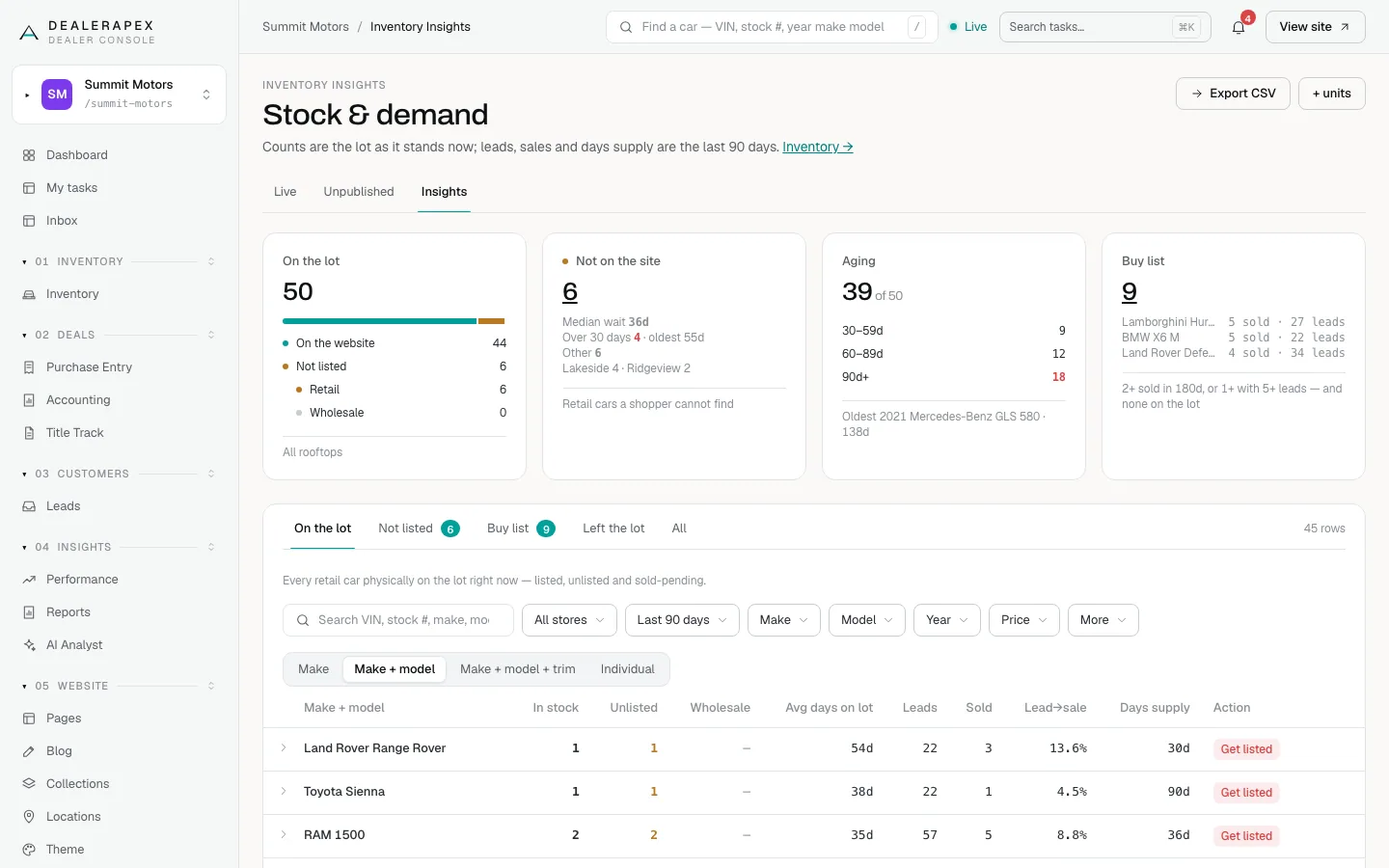
The four cards
- On the lot: every retail car you have, split into On the website and Not listed.
- Not on the site: cars on the lot that shoppers can't find, with how long they have waited.
- Aging: cars on the lot 30 days or more, split into 30–59, 60–89 and 90+ days, with your oldest car named.
- Buy list: models you have none of but have proved you can sell: two or more sold in 180 days, or one sold plus five or more leads.
Click a card's number to see the cars behind it.
Read the table
- Pick a view: On the lot, Not listed, Buy list, Left the lot or All.
- Choose how to group rows: Make, Make + model, Make + model + trim or Individual.
- Narrow it with All stores, the date window (Last 30 days, Last 60 days or Last 90 days), Make, Model, Year and Price.
- Click More for On the site, Channel, Days on lot, Mileage, Trim, Condition and Body.
- Click the arrow at the start of a row to see the individual cars in it.
The columns show In stock, Unlisted, Wholesale, Avg days on lot, Leads, Sold, Lead→sale and Days supply. Days supply is how long your stock would last at the current sales pace. ∞ means you have stock but no sales in the window.
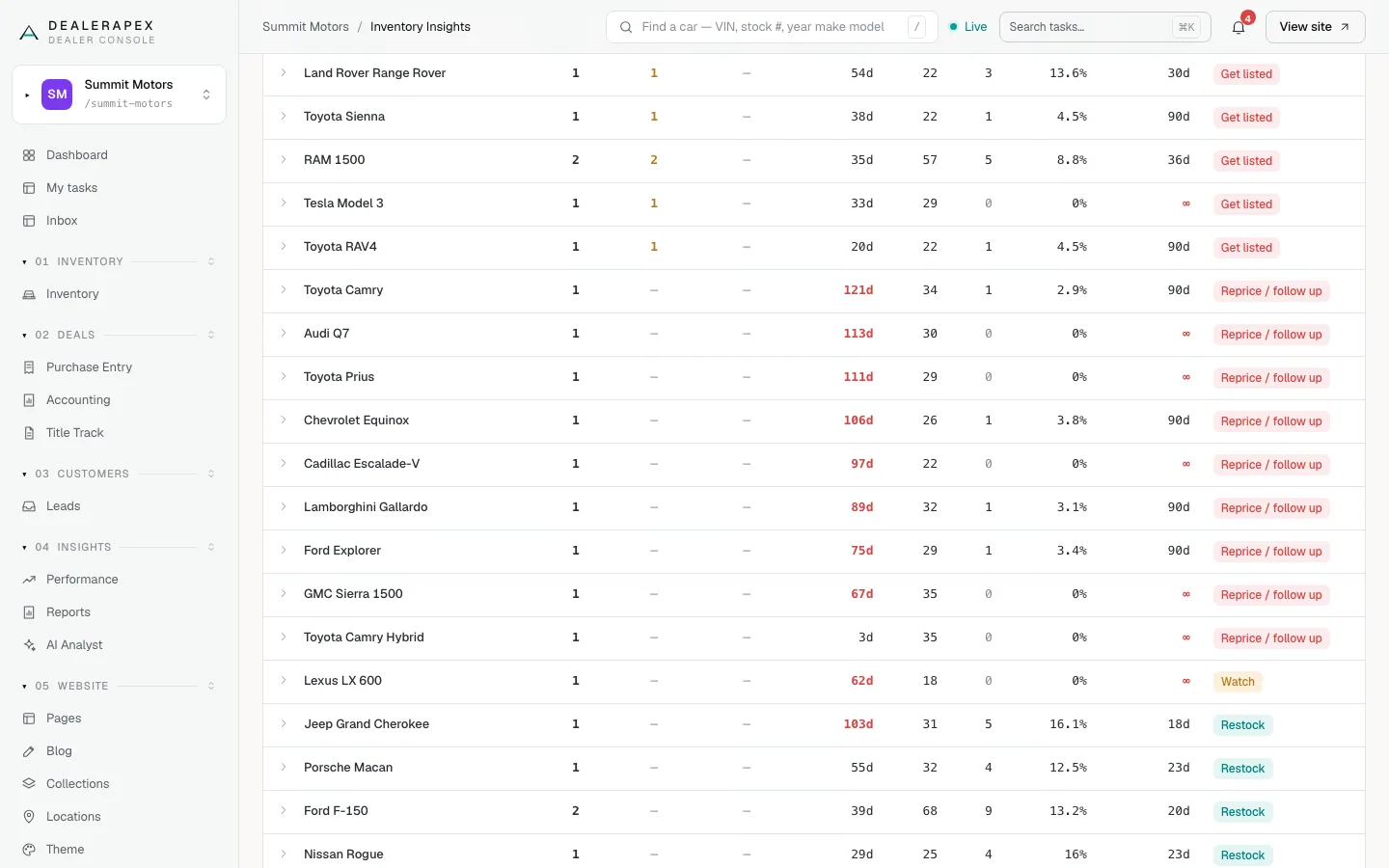
What the Action column means
Each row gets the one thing to do about that model, most urgent first:
- Get listed: a car has sat off your website for 15 days or more.
- Reprice / follow up: 20 or more leads, but no sales or a lead-to-sale rate under 4%.
- Wholesale: on the lot 60 days or more on average, with fewer than 5 leads.
- Watch: more than 90 days of supply at the current pace.
- Restock: under 30 days of supply. Buy more.
- OK: nothing to do.
Export the data
Click Export CSV to download the table as you see it, with your filters. Click + units to download it with every individual car listed under its row.
Who can do this
Owners, editors, viewers, sales managers and inventory managers can open Inventory Insights. It is read-only for everyone.
Common questions
Why do leads look the same for every trim of a model?
Your CRM records leads by model, not trim. When you group by trim, each trim shows its model's leads and sales.
Can I send someone exactly what I am looking at?
Yes. Every filter is in the page address. Copy the link and they see the same view.
What does Left the lot include?
Cars that left your feed in the last 180 days. That includes retail sales, wholesale cars and cars you pulled, because the feed does not say which.
Still stuck? Email [email protected] with the page you were on and what you expected to see.