
Check page titles and meta descriptions
The Page titles & meta table on the SEO page lists every page on your website with the title and description Google shows in search results. Use it to find pages with missing or weak text, then click through to fix them.
Who can do this
Owners and editors can change a page’s title and description. Viewers can see the table but can’t save changes. Sales managers, inventory managers, title clerks and accountants don’t see the SEO page.
Find pages that need work
- Open SEO in the sidebar, under Website.
- Stay on the SEO tab and scroll down to Page titles & meta.
- Read down the Title and Meta description columns. A page with nothing set shows (missing) in red.
- Check the Indexed column. A tick means search engines can list the page. Hidden means someone has asked search engines to leave it out.
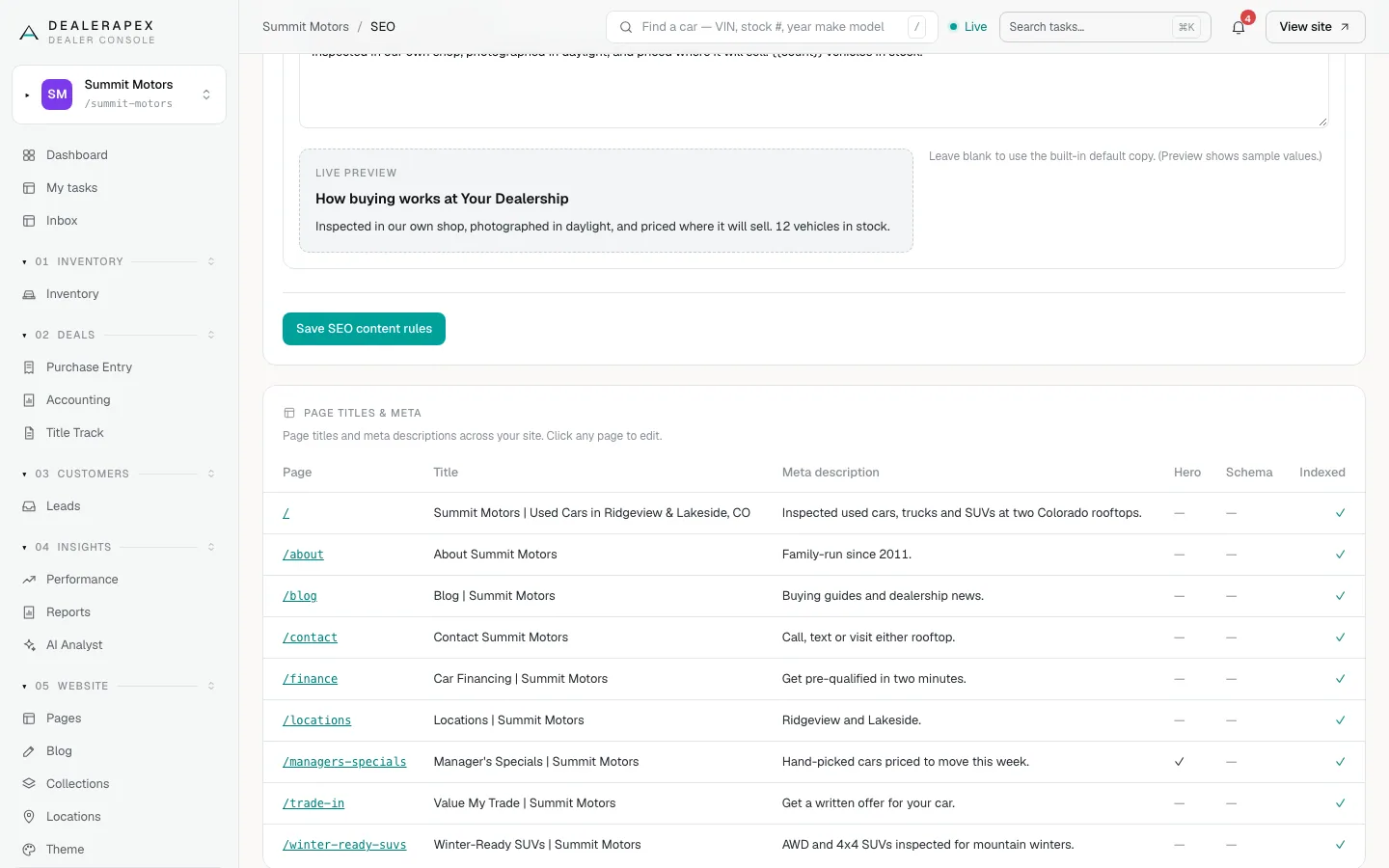
The other columns tell you what else is set on each page:
| Column | What it means |
|---|---|
| Page | The page’s address on your site. / is your homepage. |
| Hero | A tick means the page has a hero image set. |
| Schema | A tick means the page has extra structured data for search engines. |
| Indexed | A tick, or Hidden if the page is kept out of search. |
Fix a title or description
- In the Page column, click the page address. The page editor opens.
- In the SEO meta panel, edit the Title (up to 70 characters) and the Meta description (up to 160 characters).
- Click Save meta. A green Saved. message appears.
The page editor also holds the canonical URL, hero image and the Hide this page from search engines box. Edit a page’s SEO and meta covers each field.
Good titles and descriptions
- Put what the page is about first, and your dealership name last: "Car Financing | Summit Motors".
- Give every page its own title. Two pages with the same title compete with each other.
- Write the description for a shopper, not a robot. One plain sentence that says why to click is enough.
- Google sometimes rewrites what it shows. A good description still makes that less likely.
What this table does not cover
The table lists the pages you manage under Pages. Some parts of your site have their own settings:
- Your inventory page and the browse-by-make pages: see Inventory page SEO.
- Each vehicle page: the SEO copy is in the vehicle editor. See Photos, video and descriptions.
- Blog posts: each post has its own meta title and description. See Write a blog post.
Common questions
How soon does Google show my new title?
Your website updates within a minute of saving. Google only picks up the change the next time it visits the page, which can take days or a few weeks.
What should I do about pages marked (missing)?
Click the page and add a title and description. Without them, search engines guess from the page content, which usually reads worse.
Why is a page marked Hidden?
Someone ticked Hide this page from search engines in that page’s editor. Open the page and untick the box if you want it back in search. See Edit a page’s SEO and meta.
Still stuck? Email [email protected] with the page you were on and what you expected to see.